Ubuntu dropped the ball again when it comes to wireless support (in my case the Atheros AR9285/AR9287 cards). Release 12.04 being a Long Term Support (LTS) release, I was hopping that the long existing Ubuntu wifi problems would be rectified. Let us look at some ways to fix wireless problems in Ubuntu. Since the 10.04 Lucid Lynx release, the problem of intermittent / choppy wireless connectivity have existed in Ubuntu, disappointing many users including me. So how can I get wireless internet to work on Ubuntu or how to fix the wireless problems in Ubuntu?.
This however did not work on 11.04 Natty Narwhal or later. We had to create a the file /etc/modprobe.d/ath9k.conf and add the following line to it and reboot (as described in this post):
options ath9k nohwcrypt=1
Both the above solutions would fix the intermittent or choppy connectivity in Ubuntu. In 12.04 Precise Pangolin however, the wireless connectivity is even worse: it simply does not connect. The boot process halts at "Configuring Network Connection" for about 2-3 minutes before continuing to boot without network connectivity. You are then presented with a nice desktop which in these days have little use without internet connection. Reading around on the internet several people have mentioned this problem. If the above solutions don't work, read on to try other fixes.
While installing Ubuntu Server 12.04, I was thrilled to see options for Wifi connectivity during installation. I did not have to go hook up my laptop to my router (which is in a different room) to install Ubuntu Server. A headless install worked fine with Wifi connection. But only a few percentage of the users use a headless install. As soon I installed any type of Desktop Environment (Unity, Gnome, KDE, or LXDE) the network configuration problems started. If you also experience these problems, there are several possible workarounds / fixes depending on your wireless card make/model.[Read:Best mini PCIe Linux compatible wifi cards.]
Fix 1: Restart Networking After Boot (temporary fix)
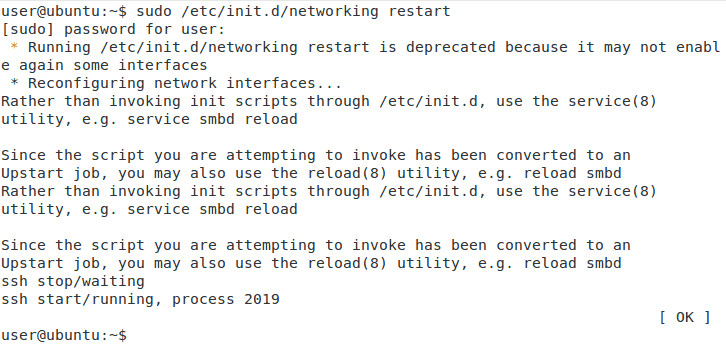
This is a temporary fix that I found out accidentally and it worked for me to get the wireless working while I try to find a more permanent solution (I am not a Linux expert). None of the solutions listed above worked for my Precise Pangolin installation. After the booting process finishes and you are on the desktop (without Wifi network connection), run the following command:
sudo /etc/init.d/networking restart
Precise Pangolin Networking Restart
You will see that this is a deprecated command and use "reload networking" or "sudo service networking restart". After the command executes, your network will be reconfigured and you should now have internet connection. Unfortunately, this has to be done after almost every reboot. You may run this command automatically when the session starts to get your Wifi to work. But the 2-3 minute delay during boot is still an annoyance.
Fix 2: Disable Wifi Card Power Management (may improve performance)
Another fix for wireless problems in Ubuntu that might work for some people and improve Wifi performance is disabling the power management for the Wifi card, using the command below. This although will mean less efficient power management and faster battery drain:
sudo iwconfig wlan0 power off
After running the above command, run the following command:
sudo iwconfig
Check for "Power Management:off" under wlan0 to ensure that the power management is turned off.
Fix 3: Disable The Use of Wireless N (decreases Wifi speed)
First, temporarily disable Wireless N using the following commands:
If your wireless performance increased and you would like this change to stick, edit the /etc/modprobe.d/iwlagn-disable11n.conf file and add the following line:
options iwlagn 11n_disable=1
Save and reboot. Personally, I like to have wireless N speeds and would recommend this as a last resort.
Fix 4: Disable IPv6 (IPv6 is not needed for most users)
Many users still use IPv4 and therefore do not need IPv6 (as long as it works I do not care which IP protocol I use).
echo "#disable ipv6" | sudo tee -a /etc/sysctl.conf
echo "net.ipv6.conf.all.disable_ipv6 = 1" | sudo tee -a /etc/sysctl.conf
echo "net.ipv6.conf.default.disable_ipv6 = 1" | sudo tee -a /etc/sysctl.conf
echo "net.ipv6.conf.lo.disable_ipv6 = 1" | sudo tee -a /etc/sysctl.conf
Fix 5: Remove and Reinstall Broadcom Drivers (only for Broadcom Wifi card user)
Many have expressed problems with Broadcom Wifi Cards due to them being blacklisted by Ubuntu. The solution in this case is to completely remove the drivers and reinstall them. First, uninstall and remove the original driver:
sudo apt-get purge bcmwl-kernel-source
Then, install firmware-b43-installer and the b43-fwcutter packages:
Then open /etc/modprobe.d/blacklist.conf and ensure that the Broadcom driver is not blacklisted. The Broadcom driver will start with the characters 'bcm'. If you do find that it is blacklisted then put a '#' in front of the line. Then reboot.
Many of these are band-aid solutions and not permanent fixes and may not solve all wireless problems in Ubuntu. I will continue to work on finding a solution for this. When I do, this post will be updated. In the long run, I hope Ubuntu does something about this. If you find a fix that worked for you please share it with us. I hope this helps someone.
UPDATE (9/1/2012): Wireless problems in Ubuntu have reduced since 12.04.01, especially Kubuntu 12.04.1.
Anand is a self-learned computer enthusiast, hopeless tinkerer (if it ain't broke, fix it), a part-time blogger, and a Scientist during the day. He has been blogging since 2010 on Linux, Ubuntu, Home/Media/File Servers, Smart Home Automation, and related HOW-TOs.


ASUS (RT-AC68U) Wireless-AC1900 Dual-Band Gigabit Router
Find out why it is rated the best wireless router in its class.